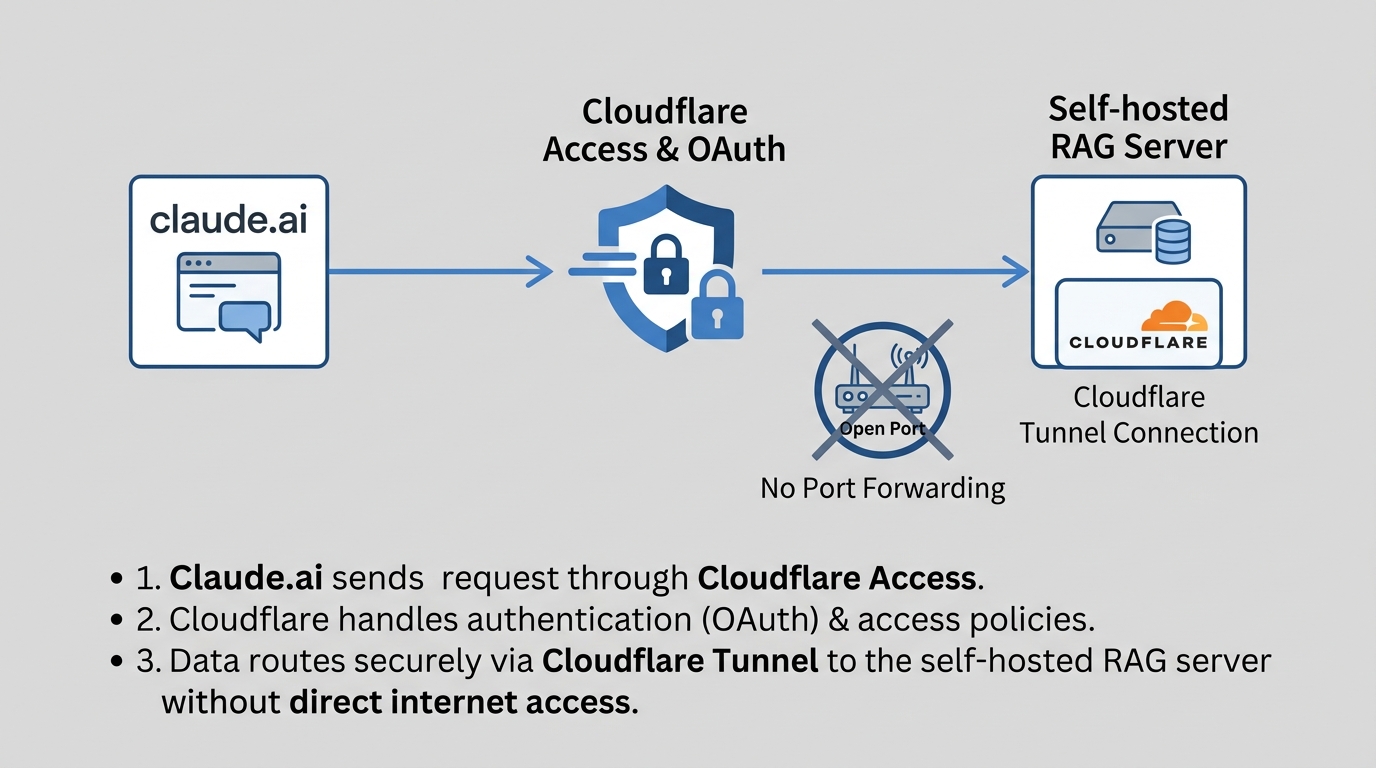
The local RAG system I built earlier this year has an MCP server on port 7861 exposing rag_search, rag_save, and a handful of knowledge graph tools. It’s been fine for Claude Code running on the same box or LAN. It’s useless from my phone, or from claude.ai in a browser on some other machine, because none of that ever needed to reach outside my network.
I wanted claude.ai itself to be able to query the knowledge base as a custom connector. Not a VPN, not a port forwarded on the router, just a URL claude.ai can add and authenticate against from anywhere. That turned out to be a bigger job than the phrase “add a connector” suggests.
The chain
Four hops between claude.ai and the container that actually does the work.
graph LR
    A["claude.ai
custom connector"] -->|"OAuth 2.1 + DCR"| B["mcp.tomakl.dev
AI Controls MCP Portal"]
    B -->|"service token bypass"| C["rag-mcp.tomakl.dev
Cloudflare Access app"]
    C -->|"Cloudflare tunnel"| D["rag-mcp container
port 7861"]

    style A fill:#e3f2fd,stroke:#1565c0
    style B fill:#f3e5f5,stroke:#6a1b9a
    style C fill:#fff3e0,stroke:#e65100
    style D fill:#c8e6c9,stroke:#2e7d32
mcp.tomakl.dev is a Cloudflare “AI Controls” MCP Server Portal. rag-mcp.tomakl.dev is a separate, plain Cloudflare Access self-hosted app protecting the real origin. The container behind it is the same one from the original post, still on port 7861, still reached through a Cloudflare tunnel so nothing on my router ever needs a forwarded port. Three of these four pieces already existed. Getting claude.ai to actually complete a connection through all of them was the part that took a week of evenings.
The server has no idea any of this exists
I mentioned in the first post that the Gradio MCP integration was convenient but fragile, and that I’d probably migrate to something more predictable eventually. That eventually happened. The server is now a small FastMCP-based Python service, and it has exactly zero built-in authentication. No API key check, no session cookie, nothing. If you can reach port 7861, you can call rag_save and write to my knowledge base.
That’s a deliberate simplification, not an oversight. Every bit of security lives at the Cloudflare edge instead of in the app. The app’s job is to answer MCP calls quickly and correctly. Auth is somebody else’s problem, and in this setup that somebody is Cloudflare Access.
Why a login wall isn’t enough
My first attempt was the obvious one: put rag-mcp.tomakl.dev behind a standard Cloudflare Access self-hosted app with one policy, allow my email, done. That’s exactly what already protects the human-facing search UI, and it works fine there because I’m a person clicking through a browser redirect.
claude.ai’s custom connector setup doesn’t work that way. The connector UI gives you a URL field and, if the server needs auth, an OAuth flow. There’s no field for a static bearer token or a custom header. And claude.ai can’t click through an interactive login page the way I can, because there’s no human sitting at a keyboard on the other end of that particular request. It hits the login wall and stops.
This isn’t a bug in my setup. It’s a known gap, tracked as an open issue on Anthropic’s claude-ai-mcp GitHub repo (issue #10, still open as of mid-2026). A plain Access login wall is built for humans. A claude.ai connector is not a human.
Two policies and a portal
The fix has three parts, and all three had to be right at once for anything to work.
First, the Access app on rag-mcp.tomakl.dev gets a second policy alongside the existing “allow my email” one. This one is a service token policy, a non_identity decision rather than an identity check. It exists purely so a specific automated client can present a client ID and secret instead of logging in.
Second, the AI Controls MCP Server Portal at mcp.tomakl.dev is configured to reach that origin using the service token. The portal backend never sees the login page. It authenticates as the service token, sails past the wall my own browsing session goes through interactively, and forwards the MCP request.
Third, and this is the part that actually matters for claude.ai, the portal is what supplies OAuth. The origin has none of its own; it’s a FastMCP server with no auth surface at all. The portal is what exposes /.well-known/oauth-authorization-server, handles dynamic client registration at /register, and runs the /authorize and /token endpoints claude.ai’s connector flow expects. Claude.ai talks OAuth to the portal. The portal talks service-token-authenticated HTTP to the real origin. Neither side needs to know how the other one actually works.
The service token credentials themselves get sent as custom headers:
| |
configured under the MCP server’s “Custom headers” auth type in AI Controls, not as an OAuth setting at all. It’s the plainest possible mechanism sitting underneath the fanciest possible one.
The bug that ate an evening
Every time I recreated the MCP server object in AI Controls, which happened more than once while I was getting the policies right, it silently saved with an empty allowed_idps list. The Access policy itself looked completely correct in the dashboard. Right email, right decision, right app. And yet claude.ai would fail to connect with “No allowed servers available, check your Zero Trust policies,” which is exactly the kind of error message that sends you back to re-reading a policy that was never the problem.
I spent longer than I want to admit re-checking that policy before I found the actual mechanism: the dashboard UI doesn’t surface allowed_idps as something you can see or fix directly. The only way to actually populate it is a direct API call:
| |
Set allowed_idps explicitly in the body, and the thing that looked broken in every other way just starts working. Nothing in the dashboard tells you this is the fix. If the server ever gets a new app ID again, this is the first thing I’ll check, not the last.
A day lost to something that wasn’t me
Partway through the first attempt, everything stopped working in a way that didn’t match any config I’d touched. I burned most of a day assuming I’d broken a policy somewhere before checking Cloudflare’s status page and finding “Workers AI experiencing degraded availability” for the exact window things fell apart. Nothing to fix on my end, just wait it out. A reasonable reminder that the status page is a five-second check and should come before an hour of re-reading your own YAML.
Confirmed working
The proof isn’t a green checkmark in a dashboard, it’s the container’s own logs. Connecting from claude.ai produces a live session right there in real time: initialize, then a ListResourcesRequest, then a ListPromptsRequest, all returning 200. That’s claude.ai on the other side of the internet, through the portal, through the Access app, through the tunnel, hitting the same FastMCP process that answers Claude Code queries on my LAN. Same server, same tools, two completely different front doors.
The rag_save workflow and the memory compiler both write into this knowledge base without knowing or caring that any of this exists. That’s the whole point of keeping the auth entirely at the edge. The server stayed exactly as simple as it was before any of this started. Everything that changed lives in Cloudflare’s configuration, not in a single line of Python.