I wanted a blog where I could say “publish this” and walk away. No CMS login, no manual deploys, no drag-and-drop editors. Just a conversation, a git push, and a working URL.
This is how it works.
The stack
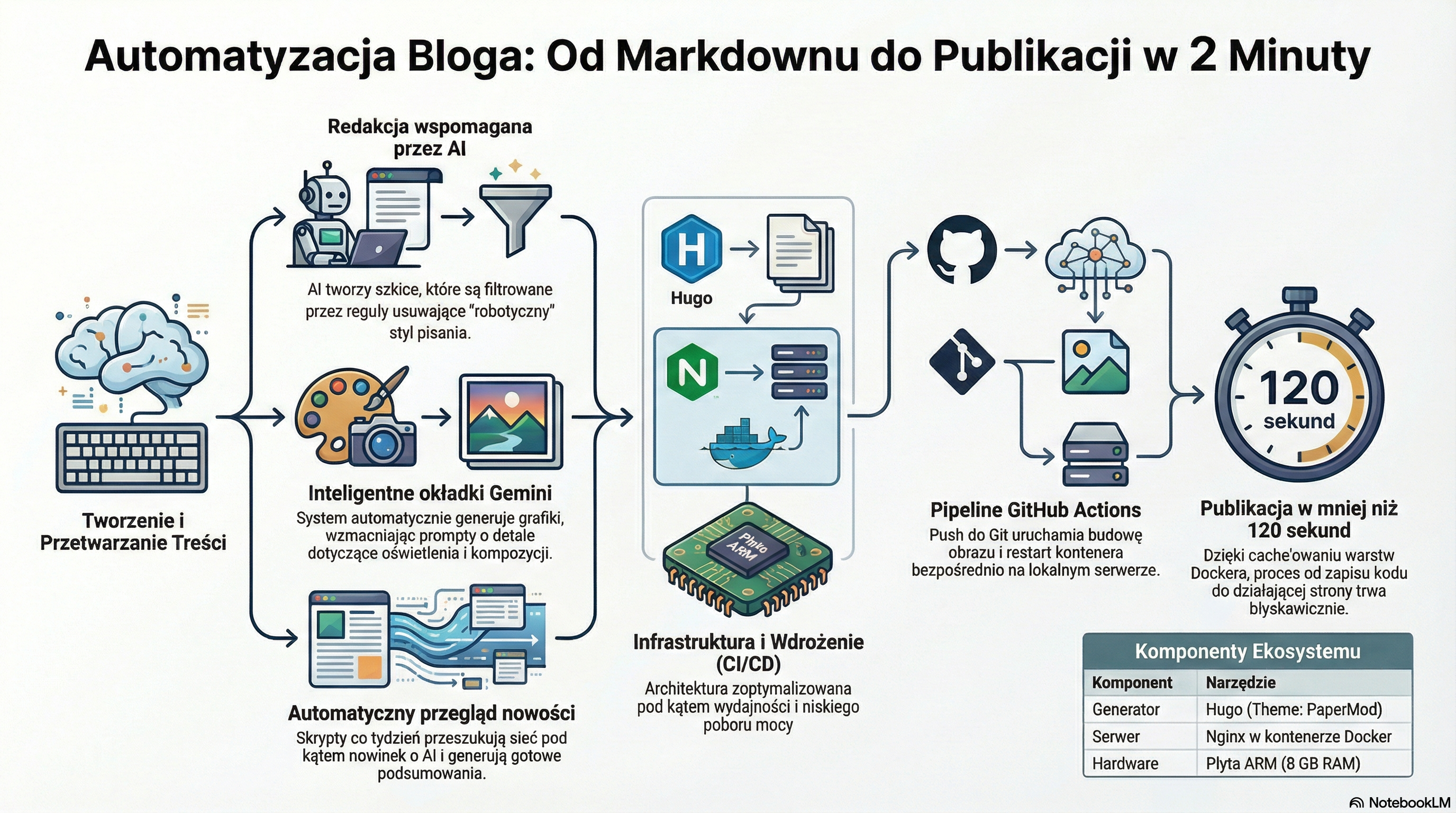
Hugo generates static HTML from markdown files. An nginx container serves the result. The whole thing runs on a small ARM board with 8 GB of RAM that also hosts a dozen other services. Not exactly enterprise infrastructure, but it hasn’t fallen over yet.
The theme is PaperMod. Clean, fast, minimal.
The Dockerfile is dead simple:
| |
Writing posts
I write posts in markdown, usually starting from notes I take while working on something. An AI assistant helps with drafting and editing, but I decide what goes in and what gets cut. The tooling handles the boring parts: frontmatter, slug generation, cover image, file placement.
Every post passes through a set of writing rules that strip out the telltale signs of AI-assisted text. No “delving into” anything. No em dashes every other sentence. No forced groups of three. The AI helps me write faster, but the voice is mine.
Cover images
Each post gets a cover image generated by Gemini’s image model. But raw prompts make generic images. So before the image generation, the prompt goes through an enhancer that turns “blog cover about Docker” into a detailed art direction with specific lighting, composition, and style references.
The generation runs as a background task with retry logic. If the API hiccups, it tries again. If it fails twice, the post publishes without a cover.
The deploy pipeline
When I push to the main branch with changes in the blog/ directory, a GitHub Actions workflow kicks in. It runs on a self-hosted runner sitting on the same ARM board:
- Check out the repo
- Build the Docker image (Hugo compiles the site, nginx serves it)
- Restart the container
- Hit the health check endpoint
The GitHub Actions workflow looks like this:
| |
The whole thing takes under two minutes. Most of that is the Docker build layer cache doing its job.
Weekly news
A separate automation searches for AI news every week using web search APIs. It collects results across a few topics: coding agents, prompt engineering, security, orchestration patterns. The best findings get summarized into a short digest post and published automatically.
The summary also passes through the same writing rules. Automated doesn’t have to mean robotic.
What is next
I’ll write about whatever I find interesting while working on infrastructure and automation. Expect posts about self-hosted services on tiny hardware, debugging production systems, and the occasional rant about configuration formats.
The automation tasks that drive the blog run on Trigger.dev, self-hosted on the same ARM board. If you’re curious about what that actually costs in RAM and what it takes to keep it running, there’s a dedicated post on self-hosting Trigger.dev on ARM64.
If something breaks in a spectacular way, that’s content too.