In the previous post I described the full setup: 120 files, 18 agents, 22 rules, 11 hooks. One piece I glossed over was the 51 custom slash commands. They’re the most visible part of the workbench, what I actually type day to day. This post covers how they work. The follow-up posts will go through each category.
What a command file is
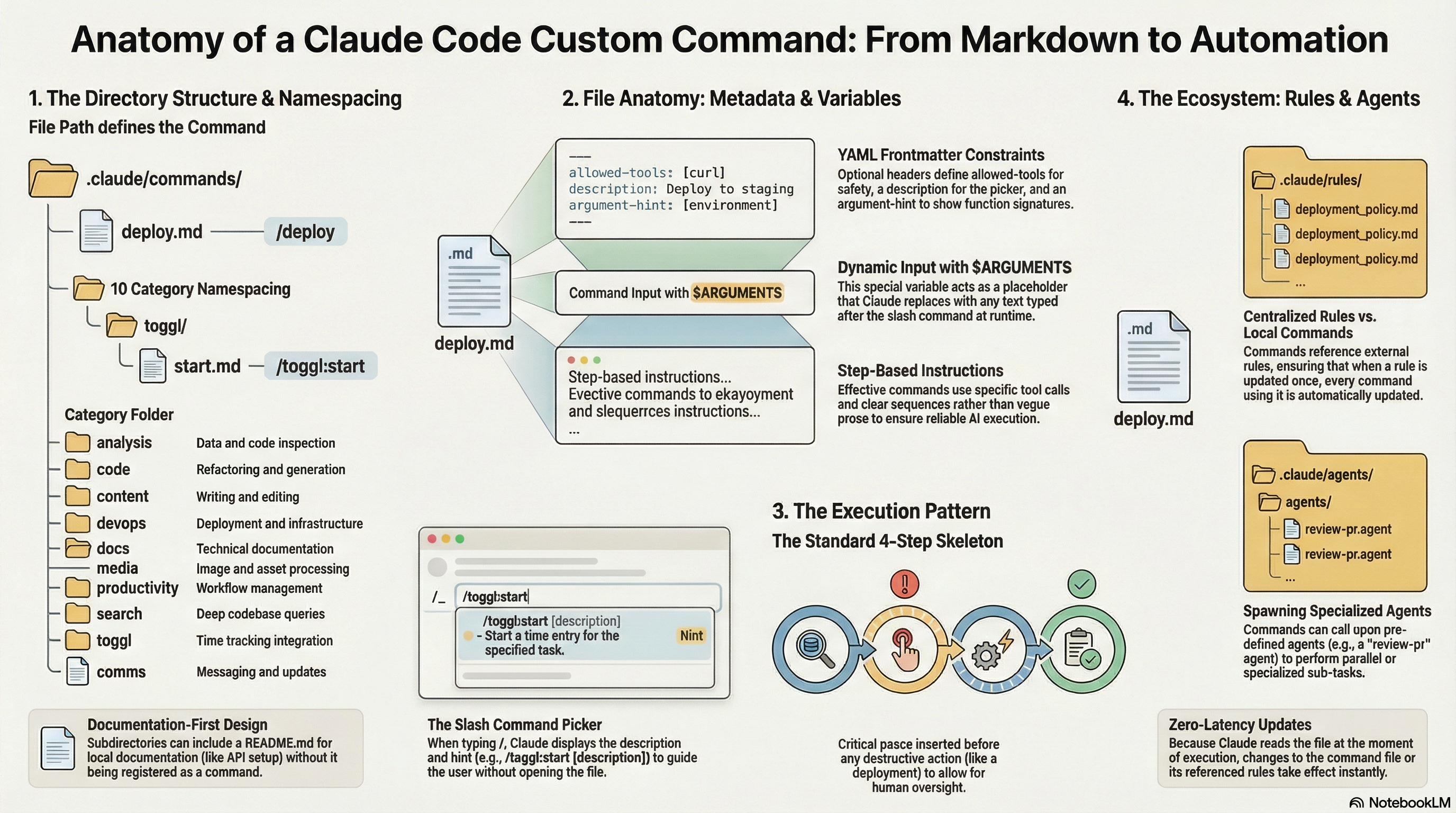
A command is a markdown file in .claude/commands/. When you type /deploy in Claude Code, it finds commands/deploy.md, reads it, and treats it as your instruction for the session. The file name is the command name. That’s the whole mechanism.
There’s no registration step, no config file to update, no restart required. Drop a markdown file in the directory and the command exists.
The simplest possible command is just instructions:
| |
$ARGUMENTS is the one special variable. It gets replaced with whatever you type after the command name. Run /summarize https://example.com/article and Claude reads the file with the URL substituted in.
If the command takes no input, you don’t need $ARGUMENTS at all. /morning runs a full system briefing with no arguments.
Frontmatter
Commands support optional YAML frontmatter with three fields:
| |
allowed-tools restricts which tools the command can use. The Toggl commands only need curl, so they’re locked to Bash(curl:*). This is a safety measure and also a signal to Claude about what’s in scope for the command.
description shows up in the command picker when you type /. It’s the one-line label next to the command name.
argument-hint shows a hint in the picker after the command name, like a function signature. /toggl:start [description] tells me what to pass without opening the file.
None of these are required. Most of my commands skip frontmatter entirely and rely on the instructions alone.
Directory structure and namespacing
Subdirectories create namespaced commands. A file at commands/toggl/start.md becomes /toggl:start, not /start. A file at commands/devops/deploy.md becomes /devops:deploy.
My structure:
| |
With 51 commands, namespacing keeps the picker readable. /toggl:start, /toggl:stop, /toggl:current, and /toggl:summary are obviously related. /deploy and /devops:deploy would be ambiguous. The colon makes the grouping visible at the call site.
You can also put a README.md inside a subdirectory. It won’t become a command, it’s just documentation that lives next to the files it describes. The toggl/ directory has one explaining the API token setup.
The pattern inside a command
The command files that actually save time share a structure. Steps, not prose. Specific tool calls, not general requests. A confirmation gate before anything destructive.
Here’s the skeleton:
| |
- Verify the result.
| |
Usage: /deploy [–strategy
| |
Claude reads that file as part of running the command. If I update the rules, every command that references them picks up the change. This keeps the command files short and the rules in one place.
The same works for agent definitions. /review-pr tells Claude to spawn parallel Explore agents for large pull requests. The agents are defined separately in .claude/agents/. The command just calls for them by name.
What’s next
That’s the mechanics. File goes in directory, name becomes command, $ARGUMENTS carries user input, frontmatter adds optional constraints, and the file body is just instructions.
The interesting part is what you put in the files. Next up: the 11 devops commands that replaced my runbooks.