Claude Code has no memory between sessions. Each conversation starts fresh. If I fixed a specific deployment issue last Thursday, figured out the right ffmpeg flags for a job, or documented a tricky PostgreSQL gotcha, that knowledge is gone the moment I close the session unless I wrote it down somewhere. The context window is also finite. I can’t paste three months of notes into every conversation.
The obvious fix is search. Give the assistant a way to query a knowledge base and pull in relevant context on demand. That’s what RAG does. I built one.
Why not just use a hosted solution
There are hosted vector databases and RAG-as-a-service products. I started with Supabase for the vector storage. It works fine, but it adds an external dependency and a network round-trip to every query. Everything I’m indexing is internal: my notes, session summaries, runbooks, infrastructure docs. Sending those to a third-party service felt wrong. Local pgvector has no external dependency, is faster for the query sizes I’m working with, costs nothing, and I can pg_dump it into a NAS backup. Easy choice.
Architecture
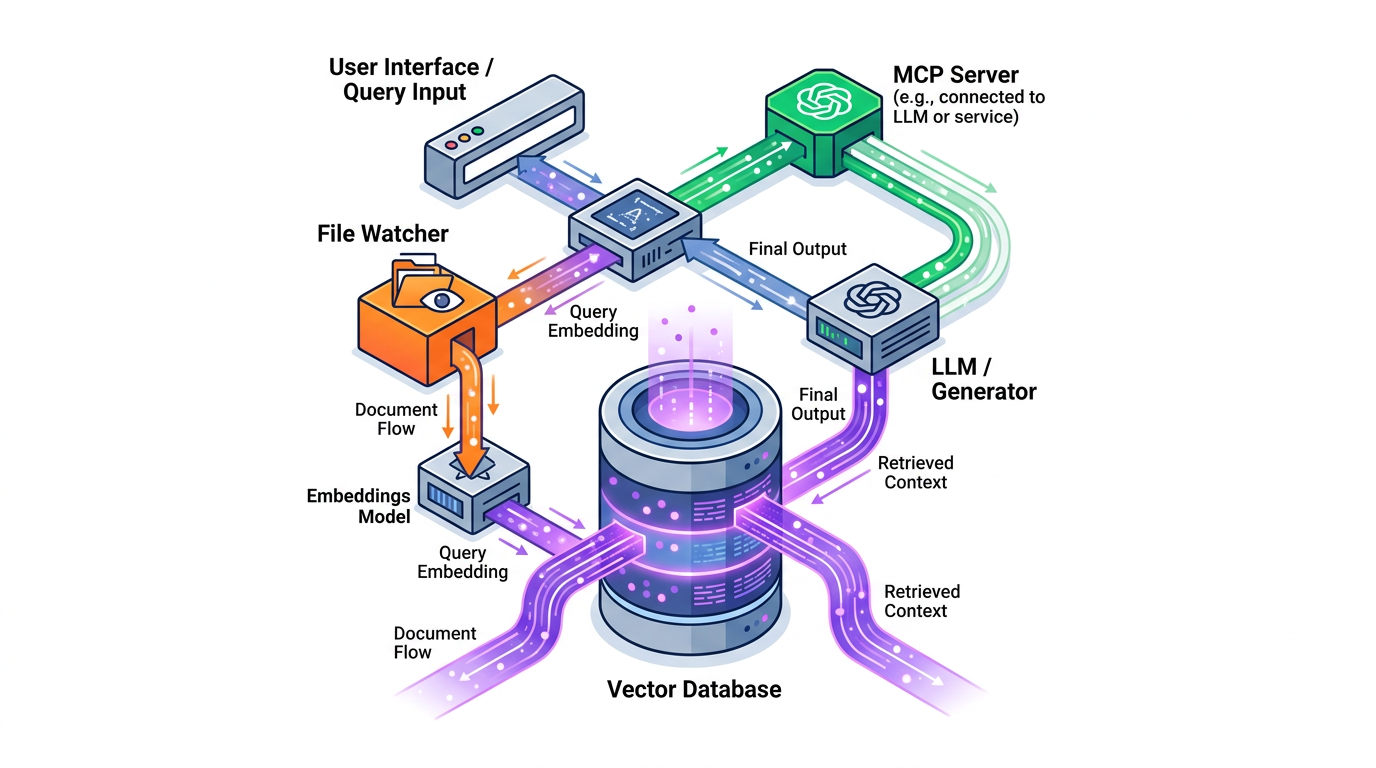
Four Docker containers, one Compose file.
graph TD
    NAS["/mnt/nas + memory files"] -->|"new/modified files"| W["rag-watcher
watchdog service"]
    W -->|"ingest + embed"| DB["rag-pgvector
pgvector + HNSW"]
    DB -->|"similarity search"| APP["multimodal-rag
Gradio web UI
port 7860"]
    DB -->|"similarity search"| MCP["rag-mcp
Gradio MCP server
port 7861 localhost"]
    APP -->|"password auth"| CF["Cloudflare tunnel
rag.tomakl.dev"]
    MCP -->|"rag_search tool"| CC["Claude Code
.mcp.json"]
    GEM["Gemini Embedding 2
1536 dims, multimodal"] -.->|"embed text/image/video"| W
    GEM -.->|"embed query"| APP
    GEM -.->|"embed query"| MCP

    style DB fill:#f3e5f5,stroke:#6a1b9a
    style MCP fill:#c8e6c9,stroke:#2e7d32
    style APP fill:#e3f2fd,stroke:#1565c0
    style CC fill:#e3f2fd,stroke:#1565c0
    style W fill:#fff3e0,stroke:#e65100
The watcher monitors /mnt/nas/ and my memory files directory. When a file is added or changed, it ingests the content, generates an embedding via Gemini, and stores it in pgvector. The web app and the MCP server both query the same database.
The embedding model choice
Gemini Embedding 2 is multimodal. One model handles text, images, and video, and they all land in the same vector space. That means a text query can retrieve an image that semantically matches it, and vice versa. I don’t have a separate vision encoder or a separate text encoder with some alignment layer bolted on. It’s one embedding space.
For video, the model has a 128-second limit per segment. I chunk into 97-second segments with 15-second overlap using ffmpeg before embedding. Overlap means a scene that straddles a chunk boundary still gets captured.
The free tier is 1,000 embeddings per day. For my indexing volume (around 170 documents right now) and query frequency, I’ve never hit that limit.
The MCP trick
The web app has password protection. That’s fine for a browser but not for an MCP tool. Claude Code’s HTTP MCP client can’t authenticate.
The fix: run two Gradio instances. One is the full web app on port 7860, behind auth, exposed via Cloudflare. The other is a minimal instance on port 7861, localhost only, no auth, MCP server mode enabled.
| |
The Docker Compose service binds only to localhost:
| |
And the .mcp.json entry:
| |
Claude Code picks it up at startup. The mcp__rag__rag_search tool is permanently allowed in my settings so it never triggers a permission prompt. I described when to use it in a rules file: internal infrastructure, past sessions, anything that starts with “do you remember…”
Preventing duplicate documents
Files get re-ingested when they change. The watcher sees a modification event and calls the ingest function again. Without a deduplication strategy, every edit would add another row.
The pattern I use: delete by source file path, then insert.
| |
For chunked files (like long PDFs or video segments), all chunks share the same source_file. The DELETE removes all of them, then the INSERT adds the fresh set. Atomic enough for my purposes.
Auto-ingestion and the watcher
The watcher is a Python service using Watchdog. It monitors two directories: /mnt/nas/ (docs, notes, runbooks, exported data) and the memory files directory. When Watchdog fires a FileModifiedEvent or FileCreatedEvent, the service calls the ingest pipeline.
I also save session summaries at the end of each Claude Code session. The file lands in the memory directory, Watchdog picks it up, and it gets embedded. Next session, a relevant query will surface that summary. It’s not perfect recall. It’s good-enough recall, which is all I need.
The sessions table also stores timestamps and metadata. When I search, I can see which source file a result came from and when it was indexed.
Vectors and HNSW
pgvector supports multiple index types. I use HNSW (Hierarchical Navigable Small World) instead of IVFFlat. HNSW builds a multi-layer graph and gives better query performance at the cost of a slower build and more memory. For a 170-document index, build time is not a concern. Query speed is.
| |
Cosine distance makes sense for normalized embedding vectors. The Gemini embeddings are unit-normalized, so cosine and dot product are equivalent, but I keep cosine explicit.
What it’s like to use
Within a Claude Code session I mostly don’t think about RAG. The rules file tells the assistant when to query it, and it does. When I mention a project I haven’t touched in a few weeks, there’s usually a moment where it pulls in the right runbook or past session note and the conversation has the right context from the start.
The /rag slash command is for explicit searches when I want to pull something specific. I also use the Gradio web UI occasionally for browsing what’s indexed or uploading something manually.
Where it falls short: the retrieval is only as good as what I’ve indexed. Session summaries help, but they’re summaries. If I didn’t write down the specific command or the exact configuration value, it won’t be in there. This is a note-taking problem more than a RAG problem.
Numbers
- ~170 documents indexed
- 1536-dimension vectors, HNSW index
- 259MB total backup (documents + 20 GitHub repo mirrors)
- Gemini Embedding 2, free tier
The 20 GitHub repo mirrors are a bonus. I have a daily cron that mirrors repos I care about to NAS, and the watcher ingests their README files and docs. That means I can ask the assistant about a library’s API and sometimes get an answer from local data rather than going to the web.
What I’d do differently
The Gradio MCP server integration is convenient but a bit fragile. Gradio’s MCP support is documented but lightly tested, and the API shape changed between versions. A purpose-built FastAPI MCP server would be more predictable. I’ll probably migrate it eventually.
The watcher also has edge cases. If a file is written in multiple atomic renames (which some editors do), you can get two ingest events for the same change. The upsert pattern handles the duplication, but there’s a brief window where a stale embedding might serve a query. Good enough for notes and docs. I wouldn’t build production search on it.
The integration with Claude Code itself took maybe 30 minutes once the Docker stack was running. Add the .mcp.json entry, approve the tool in settings, write the rules file for when to use it. The hooks and agents I had already set up made it straightforward to wire in.