A few weeks ago Anthropic published github.com/anthropics/skills. It’s a reference collection of skills for Claude, ranging from document manipulation to MCP server generation to internal communications templates. The document skills (pdf, docx, xlsx, pptx) are the actual code powering Claude’s built-in file creation features. Everything else is Apache 2.0.
More interesting than the individual skills is what the repo reveals about how the system works, and the skill-creator skill in particular, which includes a full iterative workflow with evals and a description optimizer. If you’ve been writing Claude Code skills by intuition, this is a good reference for doing it more deliberately.
What’s in the repo
The skills/ directory has 17 skills across different categories:
Creative and design: algorithmic-art, canvas-design, brand-guidelines, theme-factory, slack-gif-creator
Development and technical: mcp-builder, webapp-testing, web-artifacts-builder, frontend-design, claude-api
Enterprise and communication: internal-comms, doc-coauthoring
Document skills (source-available, not open source): pdf, docx, xlsx, pptx
The meta-skill: skill-creator
The document skills are the most interesting from a transparency angle. Anthropic notes they’re “actively used in a production AI application.” Reading through the pdf skill’s description, it handles text extraction, OCR, merging, splitting, form filling, encryption, and image extraction. A single description field covers all of it. The skill body presumably does the heavy lifting, but the description is what determines whether Claude reaches for it at all.
How skills actually work
The spec (also in the repo, pointing to agentskills.io) describes a three-level loading system:
- Metadata (name + description): always in context, roughly 100 words. This is all Claude sees when deciding whether to invoke a skill.
- SKILL.md body: loaded into context when the skill triggers, under 500 lines ideally.
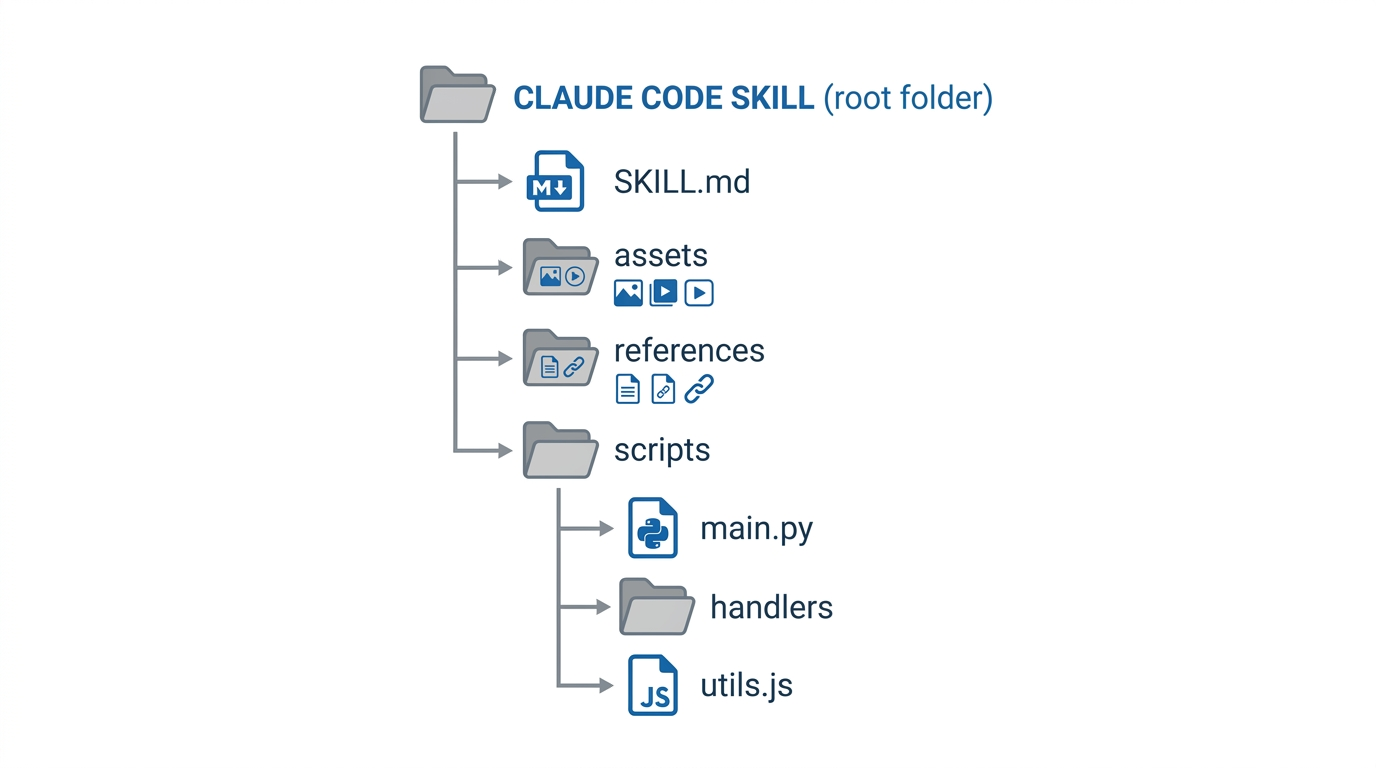
- Bundled resources: scripts, references, and assets loaded on demand.
The skill folder structure looks like this:
| |
The progressive disclosure model means you can write a lean description and a lean SKILL.md body, then offload the bulk into reference files. The skill-creator guide recommends keeping SKILL.md under 500 lines and adding a table of contents to any reference file over 300 lines.
One practical consequence of level 3: if multiple test runs all independently write the same helper script, that’s a signal to bundle it. The skill-creator guide calls this “repeated work across test cases.” Put the script in scripts/, tell the skill to use it, and every future invocation skips the reinvention step.
The description field is the whole triggering mechanism
This is the part that trips people up. Skills don’t trigger on keywords. Claude reads the name and description, then decides whether to use the skill based on how well it matches the current task. The skill body doesn’t factor in until after Claude has already decided to invoke it.
The skill-creator SKILL.md has an explicit note about this:
“Currently Claude has a tendency to ‘undertrigger’ skills – to not use them when they’d be useful. To combat this, please make the skill descriptions a little bit ‘pushy’.”
The example they give: instead of “How to build a simple fast dashboard to display internal data,” write “How to build a simple fast dashboard to display internal data. Make sure to use this skill whenever the user mentions dashboards, data visualization, internal metrics, or wants to display any kind of company data, even if they don’t explicitly ask for a ‘dashboard.’”
You can see this pattern in the pdf skill description: “If the user mentions a .pdf file or asks to produce one, use this skill.” The internal-comms skill adds “Claude should use this skill whenever asked to write some sort of internal communications.” It’s not subtle.
The repo also includes a description optimizer that runs an automated loop to improve triggering accuracy. It generates 20 eval queries (a mix of should-trigger and should-not-trigger), splits them 60/40 into train and test sets, evaluates the current description 3 times per query, then calls Claude with extended thinking to propose improvements. It runs up to 5 iterations and picks the best description by test score, not train score, to avoid overfitting. You run it as:
| |
The skill-creator workflow
The skill-creator is a skill for building skills. It’s also the most thoroughly documented thing in the repo. The workflow it describes:
- Capture intent (what should the skill do, when should it trigger)
- Write a draft SKILL.md
- Write 2-3 test prompts, run them with and without the skill in parallel
- While runs are in progress, draft quantitative assertions
- Grade results, aggregate into a benchmark, open a review viewer
- Read user feedback, improve the skill, repeat
- Optimize the description
The eval viewer is a local web app with two tabs: one for browsing qualitative outputs side by side (with-skill vs without-skill, or new vs old), one for the quantitative benchmark. The benchmark shows pass rates, timing, and token usage with mean and standard deviation. The “blind comparison” mode is optional: it gives two outputs to an independent subagent without labeling which is which, then asks it to judge quality. Most users won’t need this.
The grading step uses JSON assertions with three fields: text (description of what to check), passed (bool), and evidence (what the grader saw). The benchmark aggregation script handles the rest.
For skills with subjective outputs (writing style, design), the guide says to skip quantitative assertions entirely and rely on human review. This is sensible. Forcing pass/fail grading onto “does this look good” produces noise.
Installing from the repo in Claude Code
| |
Then browse and install either document-skills or example-skills. Or install directly:
| |
After installing, you just mention what you want to do. “Use the PDF skill to extract tables from this file” is enough. The skill triggering documentation says simple one-step requests may not trigger a skill because Claude can handle them directly; complex multi-step tasks are more reliable.
What this changes for custom skill authors
The repo’s main value for Claude Code users isn’t the individual skills. Most of them are useful references but you’d adapt them rather than use them as-is.
What’s actually useful:
The skill-creator gives you a structured iteration loop. Instead of “write a SKILL.md, try it a few times, tweak it,” you get a proper draft-test-review-improve cycle with metrics. If you’re building something you’ll use daily, the extra rigor is worth the setup.
The description optimizer removes guesswork. Triggering is the hardest part of skill design. Having a tool that generates realistic edge-case eval queries, runs them at scale, and proposes description improvements based on what failed is a meaningful time saver compared to manual tuning.
The progressive disclosure structure gives you a pattern for complex skills. If your SKILL.md is growing past 300 lines, the answer is probably references/ files, not more inline text.
The “pushy description” advice is applicable immediately. You don’t need the eval tooling to add “Use this skill whenever the user asks about X, even if they don’t explicitly mention Y” to your existing skills. If a skill isn’t triggering reliably, that’s usually why.
I’ve been writing skills for a few months now, mostly as described in the setup post and the custom commands post. The main thing I’ll take from the repo is the description optimization loop. My current skill descriptions are functional but I haven’t tested them against near-miss queries, and the “undertrigger” problem is real.
The hooks post covers the permission and safety side of Claude Code. Skills are the other half: where you put the knowledge.